Mobile Banking (Short Message)
Mobile Banking (Short Message) is a new banking service that allows customers to send formatted short messages to ICBC special service number. With this new type of financial service, ICBC processes transactions such as enquiries, transfers, remittances, donations, consumption and payment according to customer's instructions and sends back the result to customer via short messages.
Features & Advantages Service Channel Application Conditions Operation Procedures Notes Notice
I. Features & Advantages
1. Wide Service Coverage
Easy to Apply
You can enjoy all Mobile Banking services as long as your mobile can send and receive short messages. You can register Mobile Banking service by yourself through ICBC China website, or go to any ICBC Business Office to register. The registration is easy and simple.
2. Rich Functions, Convenient and Flexible
Eight kinds of services such as account enquiries, transfers , remittances, donations, bill payments and consumption can all be provided through mobile phone short messages. Moreover, you do not need to change mobile phone or SIM card before you enjoy all these new services and functions if there is any. All mobile transactions codes are composed by combining the first alphabet of each word of the transaction name for easy reference. You can send short message of "?" to find out how to use all the functions.
3. Safe and Reliable, Layers of Protection
ICBC adopts several layers of protection to secure your money. First, information in Mobile Banking (Short Message) is encrypted using international recognized standard during transmission and procession. Data between Mobile Operator and ICBC are securely transmitted and processed to prevent being stolen or compromised in this way. Secondly, a strict restriction is set for outward transfer amount through Mobile Banking (Short Message). Thirdly, the registered mobile phone of customers will be tied up with their accounts and a special pin number for payment is required.
4. 7 x 24 Services, Fund Credit into Account Instantly
You can enjoy ICBC Mobile Banking (Short Messages) service 24 hours a day and 7 days a week anytime and anywhere as far as your mobile can send and receive short messages. Money transferred and remitted is credited into accounts real time. Payments for bills and spending are completed in seconds. Everything is at your "hands".
II. Service Channel
ICBC China website, ICBC Business Offices.
III. Application Conditions
As long as customers have mobile phones from Mobile Operators partnered with ICBC and can send and receive short messages, they can enjoy ICBC Mobile Banking service. You can logon ICBC China website to immediately register Mobile Banking by yourself or go to any ICBC business offices for registration.
Self-service Registration Flow:
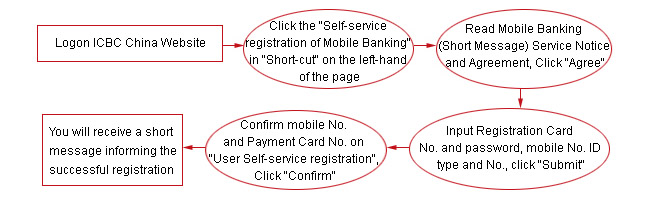
Notes:
1. If there is no confirmation message for a long time after you have registered Mobile Banking, you can activate the function by sending "JH" to 777795588. You can verify if you have registered Mobile Banking (Short Messages) successfully with this function (Users of Self-service registration and Counter registration can all use this function).
2. You can enjoy three types of services of Enquiries, Donations and Help even before registration. (Services are currently available in Beijing only. Other regions will have these services provided soon).
IV. Operating Procedures
You only need to prepare short messages in a special format and send to 777795588 (China Mobile), or 7010 denoting Spending Payment (China Unicom), or 950895588 for others:
1. Enquiries
(1) Account Enquiries: Send Short Message of "CXZH# Card No/Account No" to enquire the balance and intraday details of your bank accounts.
(2) History Enquiries: Send Short Message of "CXLS# Card No/Account No#Start Date/End Date" to find out the history details of your bank accounts.
(3) Interest Rate Enquiries: Send Short Message of "CXLL#Currency Code#Interest Rate Type" to find out the interest rate of local and foreign currency.
(4) Exchange Rate Enquiries: Send Short Message of "CXHL#Buy Currency Code#Sell Currency Code" to find out the exchange rate market info of ICBC Forex Service.
(5) Bond Enquiries: Send Short Message of "CXZQ#Bond Code" to find out the buy/sell price of listed T-Bond and accrued interest.
2. Account Transfer
By sending Short Message of "ZZ# Payment Card No. # Receiving Card No./Account No. # Amount # Payment Password", one can make money transfer between cards registered under Mobile Banking (Short Messages), and to accounts specified previously through Mobile Banking (Short Messages) and make Outward Transfer.
3. Remittances
Send Short Message of "HK # Remit-OUT Card No. # Remit-IN Card No./Account No. # Payee Name # Amount # Payment Password" to make remittances.
4. Donations
Send Short Message of "JK # Project Code # Card No. # Amount" to make donations to charity organizations.
5. Spending Payment
After you have shopped online, choose “ICBC Mobile Banking Payment" and enter your mobile number. You will then receive a short message sent by ICBC Mobile Banking (Short Message) to confirm your payment for shopping. You only need to forward the short message to (China Mobile: 777795588******, China Unicom: 7010******) to finish your payment.
6. Bill Payment
Send Short Messages of "JFDH # Tel No. # Name" or "JFSJ # Mobile No." and forward directly the confirmation short message returned by ICBC to (China Mobile: 777795588******, China Unicom: 950895588******) to complete the payment of mobile fee for yourself or others.
7. Change Registration Info of Mobile Banking
(1) Modify Password: Send Short Messages of "XGMM # Original Password # New Password" to modify the payment password of your Mobile Banking (Short Message).
(2) Change Payment Card: Send Short Messages of "GZFK # New Card No." to modify the default payment card in your Mobile Banking (Short Message).
(3) Cancel Mobile Banking:Send Short Messages of "ZX # Mobile Banking Payment Password" to cancel Mobile Banking (Short Message).
8. Help
Send Short Message of "?" to enquire the transaction codes of all Mobile Banking functions (first alphabet of the function name). Send Short Message of "? # Transaction Code" to find out the standard input format of the transaction instruction.
V. Notes
1. "Default Payment Card" is a specified card that you used to register Mobile Banking (Short Message). There is no need to input card number when you use this default card to make enquiry or transfer.
2. "Payment Password" is a password that you set and confirm when you register Mobile Banking (Short Message). You have to input this payment password when you make transfer, remittance, payment, shopping payments or cancellation. Payment Password can be a string of 6-8 integers or alphabets.
3. Transaction Code are usually made up of the first alphabet of the name of the transaction, or input the Chinese name of the transaction.
4. Use Separator to separate each input item in short message. Separator can be #, space, or comma (,).
5. ICBC Mobile Banking (Short Message) collects Information Service Fee according to the number of short messages you sent, and Transaction Fee for every inter-city remittances. For details, please refer to ICBC E-banking Charging Standard.
|