|
Payroll Payment (Expense Reimbursement)
Payroll Payment (Expense Reimbursement) is a service for companies to pay salary and reimburse expenses to all employees nationwide through ICBC Internet Banking.
Features & Advantages Service Channels Applications Conditions Operation Procedures Notices
I. Features & Advantages
Company can apply for Payroll Payment and Expense Reimbursement at the counter of ICBC business office. More quality and highly-efficient services are available if company choose to pay through Corporate Finance Room of Corporate Internet Banking, which has the following features:
1. Convenience
Corporate Finance Room is easy to operate, bypass any limitations in time and space. Company takes its time to enjoy fast and convenient banking services anytime, anywhere, without any worry about the opening hours of business offices, and restrictions on public or banking holidays. Company determines its own timing to send whenever it feels necessary.
2. Timely
If company chooses Corporate Finance Room under Internet Banking VIP Room for payroll payment, ICBC will process real-time through the computer the payroll file uploaded by company. Salary will be credited into accounts real-time. If payroll is paid through the Corporate Finance Room function of Payment Service, ICBC will automatically process through computer in batch 4 times in a day to ensure timely payment. Since this is an online operation, success or failure can be reflected on the spot. Finance staff can timely print the payroll payment details and processing result.
3. Privacy
Compared to the traditional way of using disk to pay, this service eliminates the hand-over procedures. Privacy of payroll information is improved. Besides the person in the company who is in charge of the payment, any other persons (including bank staff) have no way to find out the salaries of all staffs. Employee of the company can easily check his own salary through Personal Internet Banking by simply click the Enquire Electronic Pay-Slip under Account Enquiry. No paper pay-slips are involved, hence, easier work for finance staff and less financial cost.
4. Safety
Company choose Internet Banking Corporate Finance Room to distribute payroll or bonus not only avoid the security problems arising from claiming, delivery and keeping the cash, but also eliminate the errors in distributing cash during payment of salary or bonus.
5. Nationwide
Payment Service – Corporate Finance Room has wide coverage in distributing payroll and bonus, provided that all staffs have bank accounts opened in ICBC across the country. Company can timely pay the salary and bonus to each individual staff on time.
VIP Room- Corporate Finance Room can also distribute to personal account for other domestic banks besides ICBC personal account.
II. Service Channels
Corporate Internet Banking, ICBC Business Offices.
III. Application Conditions
Corporate Customer who needs to apply for payroll payment and expense reimbursement services through Internet Banking must have its designated payment account in Corporate Finance Room opened as deposit account in ICBC, or other accounts that have been approved by the local branch of Peoples' Banks of China to open in ICBC for cash withdrawal.
(I) Flow of opening Payment Service – Corporate Finance Room is as follows:
1. To apply for opening Payment Service – Corporate Finance Room service, new customer of Corporate Internet Banking has to submit ICBC E-banking Corporate Customer Registration Application Form and accompanied appendix to the Opening Business Office. Registered Corporate Internet Banking customer fills in ICBC E-banking Corporate Customer Amendment (Cancellation) Application Form and accompanied appendix.
2. Registered Corporate Internet Banking customer can online sign the account opening agreement to apply for opening Payment Service - Corporate Finance Room by itself.
Steps in opening the services by oneself:
1. Self-help Open Account
Corporate Internet Banking allows operator with basic authority to use this function to online open the account by oneself. Customer clicks Level-1 menu of "Payment Service" of Corporate Internet Banking and choose "Corporate Finance Room – Self-help Account Opening". After relevant corporate and account are selected with confirmation, "Account Opening Notices" is given to customer to confirm. Prompt for selecting certificate and signing with digital signature after "Confirm Account Opening" is confirmed. Prompt for successful registration for agency payment after successful signing. Account is opened successfully then.
2. Self-help Cancellation
Corporate Internet Banking allows operator with basic authority to use this function to online cancel the account by oneself. Customer clicks Level-1 menu of "Payment Service" of Corporate Internet Banking and choose "Corporate Finance Room – Self-help Account Cancellation". After relevant corporate and account are selected with confirmation, "Account Cancellation Confirmation" page is shown to customer to confirm. Prompt for selecting certificate and signing with digital signature after "Confirm Account Cancellation" is confirmed. Prompt for successful cancellation of agency payment after successful signing. Account is cancelled successfully then.
(II) Flow of opening VIP Room – Corporate Finance Room is as follows:
1. Register to be a customer of ICBC Corporate Internet Banking (procedures as above).
2. Submit ICBC E-banking Corporate Customer VIP Room Opening (Amendment, Cancellation) Application Form to opening business office to apply for opening VIP Room – Corporate Finance Room service.
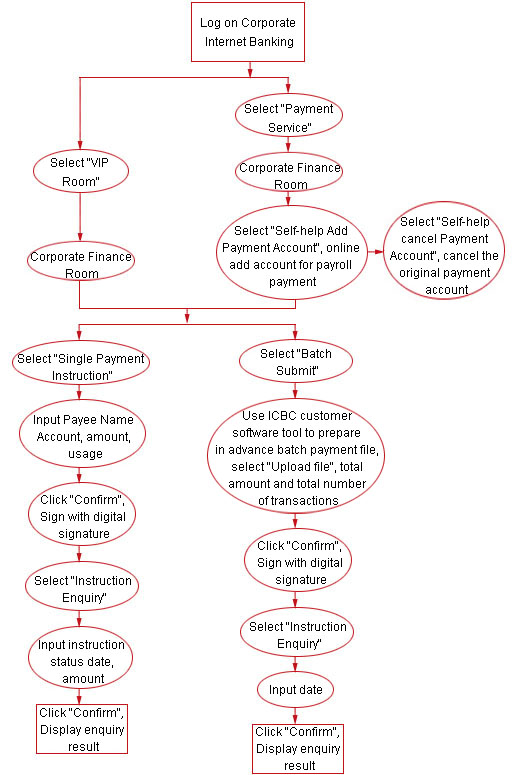
IV. Operation Procedures
Steps in using Internet Banking are as follows:
V. Notices
1. Please refer to ICBC E-Banking Charging Standard for all charges related to opening Corporate Internet Banking VIP Room service and applying for Payroll Payment, Expense Reimbursement service through Corporate Internet Banking. Charges for application through counter are based on standard fees published in business offices.
2. Each batch file cannot exceed 1000 transactions when using VIP Room – Corporate Finance Room for batch payment. Each batch file cannot exceed 2000 transactions when using Payment Service – Corporate Finance Room.
3. For transfer orders to ICBC accounts submitted in VIP Room – Corporate Finance Room, the system will check the account number and name before credit.
4.
According to related regulations of PBC, amount that company transfer to individual account in one single transaction cannot exceed RMB 50,000.
|
|